
Property binding is used to connecting a variable from component to view. It helps you set values for properties of HTML elements or directives. Use property binding to do things such as toggle button functionality, set paths programmatically, and share values between components.
It moves a value in one direction, from a component’s property into a target element property.To bind to an element’s property, enclose it in square brackets, [], which identifies the property as a target property. A target property is the DOM property to which you want to assign a value.
Property Binding Syntax
We bind properties such as class, href, src, textContent, etc to a source.
The general syntax would be like this.
[binding-target]=”binding-source”
The binding-target (or target property) is enclosed in a square bracket []. It should match the name of the property of the enclosing element.
let see the below example –
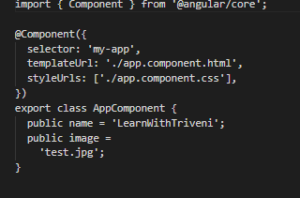
Add below code in app.component.ts file.
Add below code in app.component.html file.
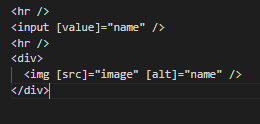
In the above example you can see that name and image is two variable. Which is used in html file as property binding. You can see these variables are binded inside the square [] bracket.
Useful Notes about the property binding :
1. Property Binding is one way
Property binding is one way as values go from the component to the template.
2. Return the proper type
The binding expression should return the correct type. The type that the target property expects. Else it won’t work.
3. Should not change the state of the app
There are several element property names in the camel case, while their corresponding attributes are not. For example rowSpan & colSpan properties of the table are in the camel case. The HTML attributes are all lowercase (rowspan & colspan).
4. Always Remember the brackets
The brackets, [], tell Angular to evaluate the template expression. If you omit the brackets, Angular treats the expression as a constant string and initialises the target property with the string.
Property Binding Vs Interpolation:
Everything that can be done from interpolation can also be done using the Property binding. Interpolation is actually a shorthand for binding to the textContent property of an element.Interpolation is simple and readable. Interpolation requires the expression to return a string. If you want to set an element property to a non-string data value, you must use property binding.
Conclusion: This is all about the property binding in angular. How we can used in our project and some points which you needs to remember while integrating it in your project. I hope you enjoyed reading this post. If you want to get more types of binding then you can refer Data binding in angular.
